Disable Metro Screen in Windows 8 Developer preview

Disable/Enable Metro Start Screen and start menu in

Windows 8 Developer preview

Metro interface is a problem for some people and like to have similar to Windows 7???
We have 2 simple Tricks here :


Method 1:
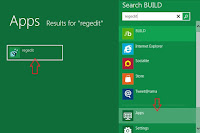
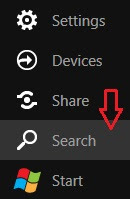
  1. Click on Start button and select 'Search'.
  2. In search box search for regedit and click on Apps at bottom .
  3. At left side you will get regedit program. Click to open that.
  4. Now Navigate to HKEY_CURRENT_USER\Software\Microsoft\Windows\CurrentVersion\Explorer
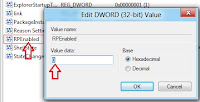
  5. Double click on 'RPEnabled' and change the value to 0.

Note : To return back to the Metro UI, just change the value back to a “1”.


Method 2:


Download the below small application that automatically changes the registry value.

Download: Click here

Windows 8 Metro theme for Windows 7


How To Install The Theme :

  • Open the "UT Patcher" folder and Right click on "UniversalThemePatcher-x86" and select 'Run it as Administrator'.
  • Click on all 3 Patch buttons.
  • Restart your computer

Now copy the two files in "Theme" folder to
C:/Windows/Resources/Themes folder.

Double Click on the "Windows Metro IM" file and you're now have the Windows Metro IM theme on your computer.


How To Use The System Files :

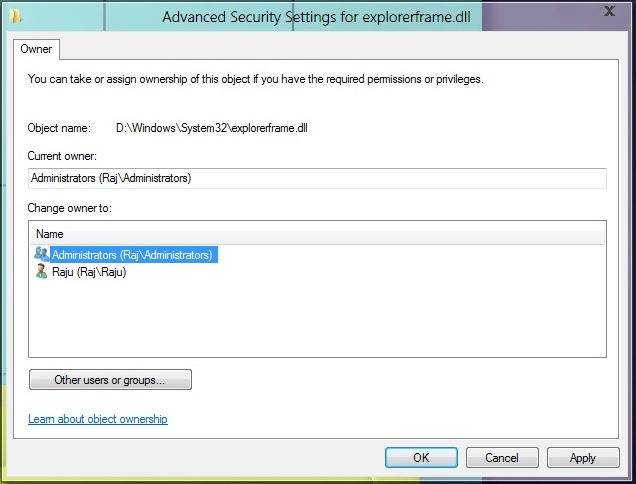
You have to take ownership of the system files ExplorerFrame.dll and shell32.dll
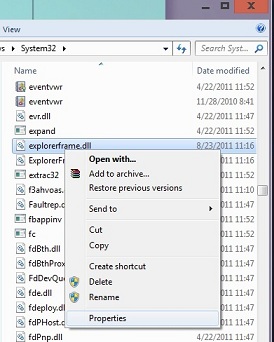
  • Go to C:/Windows/System32 and locate the explorerframe.dll Right click on it and select Properties.
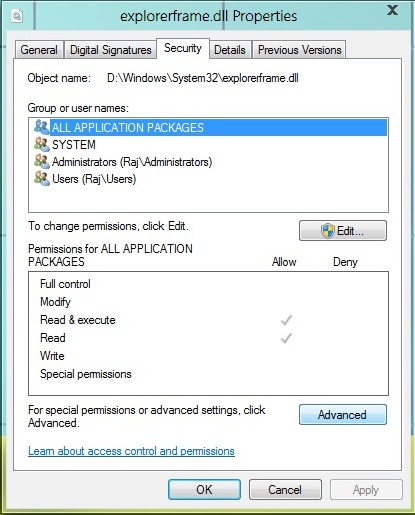
Select the security tab and then click on Advanced button.
Then a window appears go to Owner tab and click on the Edit button
Now Just click on the Administrator and click OK twice
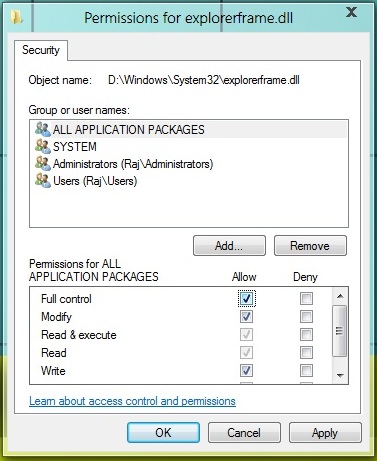
Click on the Edit button now and for all Users and Groups fill all the tick to Allow
Now click OK twice to exit.

  • Rename the explorerframe.dll to explorerframe.dll.old
  • Copy the explorerframe.dll from ExplorerFrame (for x86 Pre SP2) or ExplorerFrame (for x86 SP1) folder (you must determine which version of explorerframe you are using) to C:/Windows/System32.
  • Same procedure will apply in changing the shell32.dll (take ownership , rename , copy)
  • Restart your computer to see the changes.


In Changing The StartOrb :
  • Go to the "Start Orb Changer" folder.
  • Double Click on the "Win7 Start Button Changer" file.
  • Your current Start orb was displayed on the left side of the application.
  • Choose "Select & Change Start Button" and browse "StartOrb.bmp" file.
  • If you want to revert back to original Start Orb, just run the application and choose "Restore Original Explorer Backup".

Note: Always back up your files everytime you modify system files and if you do not know your computer's architecture then do not use the system files.


Download :

Indian Rupee Symbol Font for all Os

Indian Government announced the New Symbol for Rupee. Now onwards you can see all the transactions will be in this symbol. To get this new symbol follow the below instructions. Foradian Technologies developed this font for PC.

Instructions:
1. Download the below Font.

2. Move the Downloaded Font to "Control Panel->Fonts"

3. For you want to use the symbol, change the Font to "Rupee Foradian" and
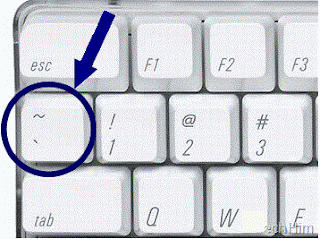
use " ` " key (Below the Esc key)


Download:
File name:
Rupee_Font.ttf

Size: 59.22 KB

Toll-free telephone number in India

A toll-free, Freecall, Freephone calls to India

Really a nice collection of Toll Free Numbers in India.


Airlines
Indian Airlines - 1800 180 1407
Jet Airways - 1800 22 5522
SpiceJet - 1800 180 3333
Air India -- 1800 22 7722
KingFisher - 1800 180 0101

Automobiles
Mahindra Scorpio - 1800 22 6006
Maruti - 1800 111 515
Tata Motors - 1800 22 5552
Windshield Experts - 1800 11 3636
Banks
ABN AMRO - 1800 11 2224
Canara Bank - 1800 44 6000
Citibank - 1800 44 2265
Corporatin Bank - 1800 443 555
Development Credit Bank - 1800 22 5769
HDFC Bank - 1800 227 227
ICICI Bank - 1800 333 499
ICICI Bank NRI - 1800 22 4848
IDBI Bank - 1800 11 6999
Indian Bank - 1800 425 1400
ING Vysya - 1800 44 9900
Kotak Mahindra Bank - 1800 22 6022
Lord Krishna Bank - 1800 11 2300
Punjab National Bank - 1800 122 222
State Bank of India - 1800 44 1955
Syndicate Bank - 1800 44 6655

Computers/IT
Adrenalin - 1800 444 445
AMD - 1800 425 6664
Apple Computers - 1800 444 683
Canon - 1800 333 366
Cisco Systems - 1800 221 777
Compaq - HP - 1800 444 999
Data One Broadband - 1800 424 1800
Dell - 1800 444 026
Epson - 1800 44 0011
eSys - 3970 0011
Genesis Tally Academy - 1800 444 888
HCL - 1800 180 8080
IBM - 1800 443 333
Lexmark - 1800 22 4477
Marshal's Point - 1800 33 4488
Microsoft - 1800 111 100
Microsoft Virus Update - 1901 333 334
Seagate - 1800 180 1104
Symantec - 1800 44 5533
TVS Electronics - 1800 444 566
WeP Peripherals - 1800 44 6446
Wipro - 1800 333 312
xerox - 1800 180 1225
Zenith - 1800 222 004

Couriers/Packers & Movers
ABT Courier - 1800 44 8585
AFL Wizz - 1800 22 9696
Agarwal Packers & Movers - 1800 11 4321
Associated Packers P Ltd - 1800 21 4560
DHL - 1800 111 345
FedEx - 1800 22 6161
Goel Packers & Movers - 1800 11 3456
UPS - 1800 22 7171

Indian Railways
Indian Railway General Enquiry 131
Indian Railway Central Enquiry 131
Indian Railway Reservation 131
Indian Railway Railway Reservation Enquiry 1345,1335,1330
Indian Railway Centralised Railway Enquiry 1330/1/2/3/4/ 5/6/7/8/9

Home Appliances
Aiwa/Sony - 1800 11 1188
Anchor Switches - 1800 22 7979
Blue Star - 1800 22 2200
Bose Audio - 1800 11 2673
Bru Coffee Vending Machines - 1800 44 7171
Daikin Air Conditioners - 1800 444 222
DishTV - 1800 12 3474
Faber Chimneys - 1800 21 4595
Godrej - 1800 22 5511
Grundfos Pumps - 1800 33 4555
LG - 1901 180 9999
Philips - 1800 22 4422
Samsung - 1800 113 444
Sanyo - 1800 11 0101
Voltas - 1800 33 4546
WorldSpace Satellite Radio - 1800 44 5432
Investments/ Finance
CAMS - 1800 44 2267
Chola Mutual Fund - 1800 22 2300
Easy IPO's - 3030 5757
Fidelity Investments - 1800 180 8000
Franklin Templeton Fund - 1800 425 4255
J M Morgan Stanley - 1800 22 0004
Kotak Mutual Fund - 1800 222 626
LIC Housing Finance - 1800 44 0005
SBI Mutual Fund - 1800 22 3040
Sharekhan - 1800 22 7500
Tata Mutual Fund - 1800 22 0101

Travel
Club Mahindra Holidays - 1800 33 4539
Cox & Kings - 1800 22 1235
God TV Tours - 1800 442 777
Kerala Tourism - 1800 444 747
Kumarakom Lake Resort - 1800 44 5030
Raj Travels & Tours - 1800 22 9900
Sita Tours - 1800 111 911
SOTC Tours - 1800 22 3344

Healthcare
Best on Health - 1800 11 8899
Dr Batras - 1800 11 6767
GlaxoSmithKline - 1800 22 8797
Johnson & Johnson - 1800 22 8111
Kaya Skin Clinic - 1800 22 5292
LifeCell - 1800 44 5323
Manmar Technologies - 1800 33 4420
Pfizer - 1800 442 442
Roche Accu-Chek - 1800 11 45 46
Rudraksha - 1800 21 4708
Varilux Lenses - 1800 44 8383
VLCC - 1800 33 1262

Insurance
AMP Sanmar - 1800 44 2200
Aviva - 1800 33 2244
Bajaj Allianz - 1800 22 5858
Chola MS General Insurance - 1800 44 5544
HDFC Standard Life - 1800 227 227
LIC - 1800 33 4433
Max New York Life - 1800 33 5577
Royal Sundaram - 1800 33 8899
SBI Life Insurance - 1800 22 9090

Hotel Reservations

GRT Grand - 1800 44 5500
InterContinental Hotels Group - 1800 111 000
Marriott - 1800 22 0044
Sarovar Park Plaza - 1800 111 222
Taj Holidays - 1800 111 825


Teleshopping
Asian Sky Shop - 1800 22 1800
Jaipan Teleshoppe - 1800 11 5225
Tele Brands - 1800 11 8000
VMI Teleshopping - 1800 447 777
WWS Teleshopping - 1800 220 777
Cell Phones
BenQ - 1800 22 08 08
Bird CellPhones - 1800 11 7700
Motorola MotoAssist - 1800 11 1211
Nokia - 3030 3838
Sony Ericsson - 3901 1111

Others

Domino's Pizza - 1800 111 123

Pc Build And Repair

Do It Yourself...
All you need is this Tutorial


This is 2 hrs tutorial video which guides you to build and repair your computer almost without needing any help of Technician.


Download Links:


http://www.fileserve.com/file/7Fpz9CM/PC.BuildAndRepair.part1.rar
http://www.fileserve.com/file/tEHrZ4s/PC.BuildAndRepair.part2.rar
http://www.fileserve.com/file/d2JcqE6/PC.BuildAndRepair.part3.rar
http://www.fileserve.com/file/2X8CDWR/PC.BuildAndRepair.part4.rar
http://www.fileserve.com/file/uwGvhX3/PC.BuildAndRepair.part5.rar


http://www.filefactory.com/file/b27c7h0/n/PC.BuildAndRepair.part1.rar
http://www.filefactory.com/file/b27c7h1/n/PC.BuildAndRepair.part2.rar
http://www.filefactory.com/file/b27c7h3/n/PC.BuildAndRepair.part3.rar
http://www.filefactory.com/file/b27c7ge/n/PC.BuildAndRepair.part4.rar
http://www.filefactory.com/file/b27c7gb/n/PC.BuildAndRepair.part5.rar

http://hotfile.com/dl/53658978/866a171/PC.BuildAndRepair.part5.rar.html
http://hotfile.com/dl/53659115/9a93ebe/PC.BuildAndRepair.part4.rar.html
http://hotfile.com/dl/53659314/0744e59/PC.BuildAndRepair.part3.rar.html
http://hotfile.com/dl/53659536/e21447b/PC.BuildAndRepair.part2.rar.html
http://hotfile.com/dl/53659714/989e798/PC.BuildAndRepair.part1.rar.html

http://rapidshare.com/files/405933698/PC.BuildAndRepair.part5.rar
http://rapidshare.com/files/405896585/PC.BuildAndRepair.part4.rar
http://rapidshare.com/files/405847265/PC.BuildAndRepair.part3.rar
http://rapidshare.com/files/405813897/PC.BuildAndRepair.part2.rar
http://rapidshare.com/files/405744080/PC.BuildAndRepair.part1.rar

Airtel new trick for unlimited free internet

Airtel gives New option to the Subscriber to access Mobile Office @ Rs.25.00/- per day.

But this Trick helps u to Access Mobile Office for 30 days for just 25rs only.


Steps for free internet:
1) Maintain ur account balance above Rs: 25.00 for the first time.

2) Activate your Mobile Office by dialing *444*1#.

3) You will get an Activation msg after activation and ur ....account deducted by Rs. 25.00

4) Now U can enjoy Mobile Office for 24 hours.

5) But for unlimited access u must do this -> Switch off your mobile from 7.00 am to 10.00am. .....and maintain ur account balance below RS:25.00.


Thats it.... Hack Your self.. Enjoy your self..

Windows 7 Ultimate Final Cracks


Windows 7Loader is a program that will make a non-genuine copy of Windows 7 activated permanently.

No need to register through internet.

Just Download Windows 7 Loader 1.6.9 ,
extract it and run it.


Enjoy FULL version for free with updates .


Download:

Bypass Activation While Installing Windows Media Player 11


Install Windows Media Player 11 without activating / bypass

Bypassing the activation while installing Windows Media Player 11 is simple.

Basically what we will do is download the setup file (.exe) from microsoft and then extract its contents and manually run components to run Media Player 11.


STEP 1: Download Windows Media Player 11. Go here to download. http://www.microsoft.com/windows/windowsmedia/download/AllDownloads.aspx

STEP 2: Now you need win-rar or win-zip to extract files. You can Download win-rar from here.

STEP 3: Right-click on the File (usually named: wmp11-windowsxp-x86-enu.exe) and select Extract to wmp11-windowsxp-x86-enu\

STEP 4: Once you do this, you will see a folder called wmp11-windowsxp-x86-enu . As show in image below. Open that folder and manually run the two files.

First run: wmfdist11.exe
This is the media player 11 runtime files.
Go through the installation wizard and then run: wmp11.exe
This will in turn install Windows Media Player 11 and will bypass the activation part of the installer.

Once you finish , reboot your system.


This process will not require any activation and in turn allow you to install on a non-activated XP.

Convert 4.7 GB Movie To a 100 MB


First of all you need these softwares :

Download and Install all the Softwares.

1) DivX Create Bundle

2) DVD2AVI

3) DVD Decrypter

4) LAME ACM Codec

5) Virtual Dub


Steps to convert 4.7 GB Movie To 100 MB Movie:

Step (1): Insert your DVD into the drive and launch DVD decrypter. DVD Decrypter will detect the DVD and its file contents will now be displayed in the right pane. Now go to File > Browse and select the destination for the ripped VOB files. Keep in mind that the destination must have enough free space to store the contents of the entire DVD.

Step (2Bold): After choosing the destination, click on File>Decrypt to start the decryption process. DVD Decrypter removes the Macrovision Protection by default, and you can set to remove region code as well by going to Tools > IFO > Region > Patch > Region Free. These are necessary for the next step. After the DVD ripping process is completed, close DVD Decrypter.

Step (3): Next Launch DVD2AVI. Go to File > Open. Make sure the correct track number in the Audio menu is selected. You need to find the correct track number-most DVDs have multiple audio tracks in different languages. This can be checked by selecting one track at a time and playing it. Also click on the Audio menu and navigate to “48>44.1KHz”, and select Off. Go to Help > SIMD Technology and select all the optimizations supported by your processor. Now go to File > Save As AVI.

Step (4): Decide on a file name and choose a location with enough free space. You will now be prompted to choose a video compressor. Choose “DivX 6.x.x” from the drop-down menu where you can select the video compressor.

Step (5): Under the Certification Profiles, you can choose an appropriate preset profile such as High Definition, Home Theatre, Portable, Handheld, and Unconstrained. When you choose one of the above profiles, it is virtually guaranteed that the encoded DivX file will be playable on any standalone DivX-certified player. Click on Settings. You can select a bitrate of your choice. A higher bitrate means a larger file size and better quality, while a lower bitrate means a smaller file size and lower image quality.

Step (6): In the Codec tab, you can set the Encoding mode. The default setting is a good trade-off between quality and compression, but if you wish to control the file size, you can state your own mode such as High Performance, Better Quality, etc. Click on OK and then on save to start the video

demultiplexing process. This will take some time depending on the speed of your computer. At the end of this process, you’ll have an AVI file and a WAV file.

Step (7): We now get to the creation of the DivX file-putting together the video (AVI) and audio (WAV) files that were created in the previous step. Launch Virtual Dub. Under File > Open, browse to the folder where the AVI and WAV files are stored. Select the AVI file and click Open.

Step (8): Click on the Audio menu and click “Full Processing Mode”. Click again on the Audio menu and select “WAV Audio”. You will be prompted to open a WAV file. Select the WAV file you created earlier and click Open. Click on the Audio menu and then on Compression. Select “MPEG Layer-3” from the left pane and then select “128 KBit/s, 48,000Hz, Streo” in the right pane. Click OK.

Step (9): Select Interleaving from the Audio menu. Then, select the “mis” radio button and input “500” into the “Interleave audio every” dialog box. Click OK. Again, in the Audio menu, select Volume. Check the box and move the slider to 200 percent. Click OK.

Step (10): From the Video menu, select Direct Stream Copy.

Step (11): Go to File > Save As. Enter a file name of your choice at a location of your choice, and click at a location of your choice, and click OK. This, again, will take some time, but not as much as the video encoding using DVD2AVI. After the process is complete, you’ll have a DivX backup of ypur DVD movie.

Step (12): All that’s left now is to burn the DivX backup up to CD or DVD using your DVD-Writer


Downlaod
Speed up Your Applications

Speed up Your Applications Checked 100% working.
If your Application are running slowly ?
Then don't worry follow these simple steps.And it works on XP , Vista, Windows 7.

  • Go on: Start Menu >> Run

  • Type: Regedit

  • Look For the Keys: HKEY_LOCAL_MECHINE\SYSTEM\CurrentConrolSet\Control \Session Manager\Memory Management\PrefetchParameters

  • Now Select The DWORD KEY : ENABLEPREFETCHERA

  • Change The Value To: 6

  • Now Close The Registery Editor And Restart Your Computer.

Multiple Google Talks


To Make Your Google talk to Multiple Google talk , follow the below steps :

  1. Create a shortcut of Gtalk on the Desktop
  2. Right click and select properties.
  3. In the Target: rename it as "C:\Program Files\Google\Google Talk\googletalk.exe" /nomutex"
  4. Click on ok button.

Now you can open multiple Google Talks with multiple accounts.

Windows 7 Evaluation Period Resetting


Windows 7 Evaluation Period Resetting | Crack for Windows 7

  • Step 1: Click Start, All Programs, Accessories. Right-click Command Prompt and choose Run As Administrator. Enter your administrator password.

  • Step 2: Type the following command and press Enter:

slmgr -rearm

Note the space after slmgr and the hyphen in front of rearm.

  • Step 3: Restart Windows 7

Ye Maaya Chesave naga chaitanaya Music Songs Mp3 Download


Ye Maaya Chesave(2010)

Cast : Naga Chaitanya, Samantha
Music : A.R.Rahman
Lyrics : Anantha Sriram


01 - Kundanapu Bomma
Singers : Benny Dayal, Kalyani Menon
Lyrics : Anantha Sriram
Malayalam Lyrics : Kalyani Menon

02 - Manasaa
Singers : Devan Ekambaram, Chinmayi
Lyrics : Anantha Sriram

03 - Swaasye
Singers : Karthik
Lyrics : Anantha Sriram
Additional vox : Vivek Agarwal

04 - Ee Hridayam
Singers : Vijay Prakash, Suzanne, Blaaze
Lyrics : Anantha Sriram
English Rap Lyrics : Blaaze

05 - Aakaasam
Singers : Naresh Iyer
Lyrics : Anantha Sriram

06 - Vintunnavaa
Singers : Karthik, Shreya Ghoshal
Lyrics : Anantha Sriram

07 - Aaromale
Singers : Alphonse
Lyrics : Anantha Sriram
Malayalam Lyrics : Kaithapram


Download:

Save as PDF or XPS with MS office 2007 Add-in


This download allows you to export and save to the PDF and XPS formats in Office 2007. It also allows you to send as e-mail attachment in the PDF and XPS formats in a subset of these programs.

System Requirements :
Operating Systems: Windows Server 2003; Windows Vista; Windows XP Service Pack 2
This download works with 2007 Office programs.


Download:


How to install:
Download the file to your hard disk.
Double-click the SaveAsPDFandXPS.exe program file to start the Setup program.
Complete the installation.

Screen Shot :

How Mona Lisa Looks Like(funny)

How Mona Lisa Looks Like :

In London


In Iraq


In Morocco


In Lebanon


In Egypt


In Kuwait


In Saudi Arabia


In Palestine


In Dubai


In Afghanistan